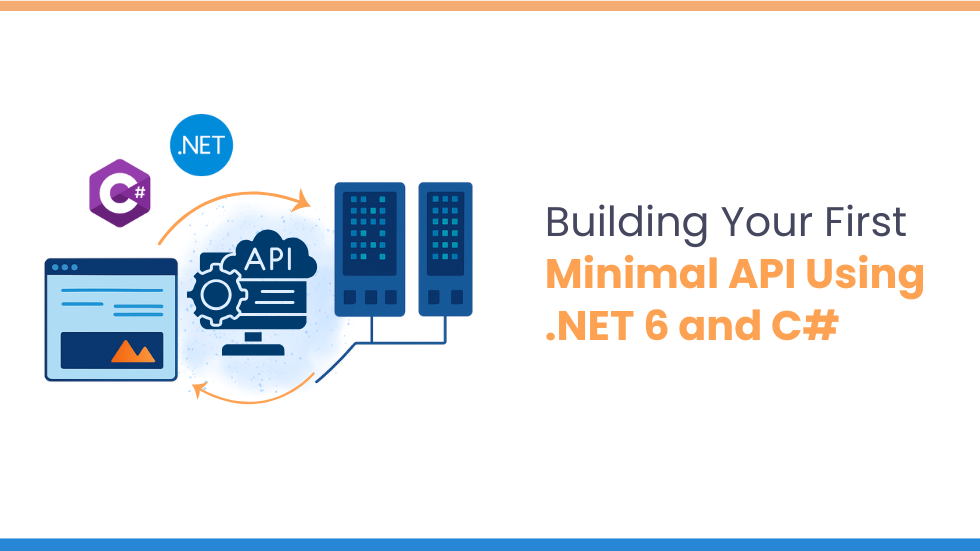
Utilisation minimale de l’API.NET et C# offrent une approche rapide, légère et moderne pour créer des API HTTP en utilisant une configuration minimale et un code passe-partout. Introduit dans .NET6Les API minimales sont devenues de plus en plus populaires pour microservices, applications cloud nativeset prototypage rapide en raison de leur simplicité et de leurs performances. Dans ce blog, vous apprendrez à créer un API minimale étape par étape utilisant .NET et C#configurez les points de terminaison et exécutez votre premier projet d’API léger.
Conditions préalables à la création d’une API minimale dans .NET 6
Avant de commencer, assurez-vous d’avoir :
SDK .NET installé (version 6 ou ultérieure)
Un éditeur de code (comme Visual Studio, VS Code ou JetBrains Rider)
Connaissance de base de C#, API RESTet Méthodes HTTP
Création d’une API minimale à l’aide de la configuration du projet .NET 6 et C#
Ouvrez votre terminal ou votre invite de commande et créez un nouveau projet API Minimal à l’aide de la commande suivante :
dotnet new web -n MinimalApiDemo
Fondamentalement, cette commande crée un nouveau projet Web nommé MinimalApiDémo.
Accédez au répertoire du projet
cd MinimalApiDemo
Ouvrez le projet dans votre éditeur
À l’étape suivante, ouvrez le projet dans votre éditeur de code préféré pour explorer et travailler avec les fichiers.
Définir le modèle dans une API minimale
Commençons par créer un modèle simple pour un élément Todo. Dans votre dossier de projet, créez un nouveau fichier appelé TodoItem.cs et ajoutez le code ci-dessous :
public class TodoItem
{
public int Id { get; set; }
public string? Title { get; set; }
public bool IsCompleted { get; set; }
}
Configuration des points de terminaison d’API à l’aide de .NET 6 et C#
Définissons maintenant les points de terminaison de l’API qui géreront diverses requêtes HTTP. Pour ce faire, ouvrez le Programme.cs fichier et remplacez ou mettez à jour le code existant avec l’exemple ci-dessous :
var builder = WebApplication.CreateBuilder(args);
var app = builder.Build();
List<TodoItem> todos = new();
app.MapGet("/todos", () => todos);
app.MapGet("/todos/{id}", (int id) =>
todos.FirstOrDefault(t => t.Id == id)
);
app.MapPost("/todos", (TodoItem todo) =>
{
todo.Id = todos.Count + 1;
todos.Add(todo);
return Results.Created($"/todos/{todo.Id}", todo);
});
app.MapPut("/todos/{id}", (int id, TodoItem updatedTodo) =>
{
var todo = todos.FirstOrDefault(t => t.Id == id);
if (todo is null) return Results.NotFound();
todo.Title = updatedTodo.Title;
todo.IsCompleted = updatedTodo.IsCompleted;
return Results.Ok(todo);
});
app.MapDelete("/todos/{id}", (int id) =>
{
var todo = todos.FirstOrDefault(t => t.Id == id);
if (todo is null) return Results.NotFound();
todos.Remove(todo);
return Results.NoContent();
});
app.Run();
Explication du Code
Injection de dépendance
Nous utilisons une liste singleton pour stocker TodoItem objets, fournissant un mécanisme simple de stockage en mémoire à des fins de démonstration.
Points de terminaison de l’API
OBTENIR /tout → Récupérer toutes les tâches
OBTENIR /todos/{id} → Obtenir une tâche à faire par ID
PUBLIER /tous → Créer une nouvelle tâche
METTRE /todos/{id} → Mettre à jour une tâche à effectuer
SUPPRIMER /todos/{id} → Supprimer chaque élément
Exécuter l’API
En gros, pour exécuter l’API, exécutez la commande suivante dans votre terminal :
dotnet run
Une fois l’application lancée, votre API sera accessible sur http://localhost:5000. Vous pouvez tester les points de terminaison à l’aide d’outils tels que Facteur ou boucle.
Exécuter et tester l’API minimale
Exemples de demandes
Créer un nouvel élément Todo à l’aide d’une requête POST
L'API minimale utilisant .NET offre un moyen propre, rapide et efficace de créer des services à petite échelle sans la surcharge des contrôleurs traditionnels. Ils sont parfaits pour microservices, applications cloud natives, prototypageet des scénarios où les performances et la simplicité comptent. Avec seulement quelques lignes de code C#, vous pouvez créer des points de terminaison entièrement fonctionnels, les tester rapidement et passer de simples démos à des services prêts pour la production.
Que vous soyez débutant ou développeur .NET expérimenté, les API Minimal sont un ajout puissant à votre boîte à outils de développement.
If you’ve ever wondered whether AI agents can actually build real web apps, or whether the industry is just showing you polished demo theater, this article cuts through the noise and gives you the most honest answer you’ll read this year.
Before we get into the details, consider the questions that brought you here:
Can AI agents truly take over parts of the development workflow, or do they still crumble without human guidance?
How do modern agentic platforms differ from the traditional IDEs, frameworks, and toolchains developers already rely on?
What’s the safest, smartest, and most profitable way to introduce agents into a real engineering process, without breaking your system or your team?
As Alan Kay said, “The best way to predict the future is to invent it.” And in 2025, that future is being reinvented through agentic development, though not in the way hype videos suggest.
The transition toward AI-driven engineering is no longer theoretical. Leading labs and cloud vendors have published real studies and rolled out early production systems demonstrating both the promise and dangers of agentic coding: significant speed gains on repetitive tasks, paired with non-trivial risks like security oversights, hallucinated commands, and incorrect multi-step changes in critical code paths. Evaluations from OpenAI, Google, Anthropic, AWS, and others show a consistent pattern: agents can dramatically accelerate development, but only when used inside the right workflows, with the right expectations.
By reading this article, you will understand exactly how AI agents work, where they outperform humans, where they fail, how they integrate with traditional tools, and how to use them effectively without compromising quality, safety, or long-term maintainability.
Traditional Dev Tools: The Baseline
Before we talk about AI agents, it’s important to understand the foundation they’re disrupting, not replacing, but accelerating. For the past decade, web app development has relied on a predictable but heavy workflow built around manual coordination of tools, frameworks, and infrastructure. This workflow is powerful, reliable, and well-understood… but also slow, repetitive, and expensive.
What “Traditional Development” Actually Looks Like
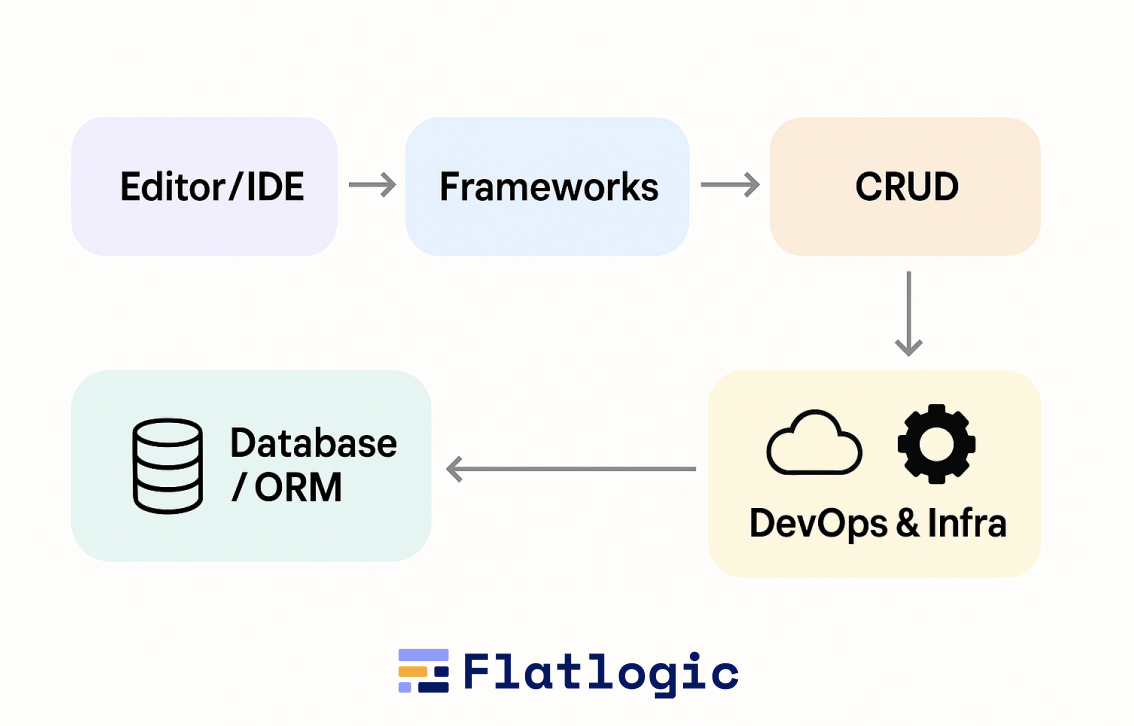
A typical engineering setup, whether a startup or an enterprise, relies on a stack like this:
Editor / IDE
Frameworks
Package & Build Tools
Database + ORM
DevOps & Infra
These tools are individually powerful, but in combination, they create cognitive load. A senior engineer juggles:
architecture decisions
schema design
CRUD boilerplate
data validation
routing
form wiring
API contracts
migration scripts
component layouts
error handling
devops configs
deployments
Every piece requires manual typing, wiring, and checking.
The Hidden Cost: Everything Starts From Zero
Even for the simplest CRUD app, the traditional workflow requires:
Initializing a repo
Scaffolding frontend + backend
Setting up auth and roles
Creating the data model
Writing migrations
Generating API routes
Implementing controllers/services
Building tables, forms, and detail screens
Adding validation, pagination, and sorting
Deploying to staging
Debugging and fixing integration issues
Every new project starts with technically trivial but time-consuming steps. This is why many developers joke:
“Building an app is 20% building features… and 80% wiring everything so they don’t break.”
Why This Model Worked (for a While)
Traditional development dominated because it offered:
Full control over the codebase
Predictability, tools behave as expected
A huge ecosystem of libraries, frameworks, and best practices
Clear separation of responsibilities within teams
Strong debugging and testing workflows
These are still valuable today. Agents haven’t replaced this foundation, they stand on top of it.
Where the Model Started to Crack
By 2023-2024, the engineering world hit a wall:
Bootstrapping new apps became slower relative to business expectations.
Developers spent disproportionate time on boilerplate, not innovation.
Hiring became expensive and was bottlenecked by senior-level expertise.
Framework complexity grew faster than developer bandwidth.
Even simple features required multiple layers of changes across the stack.
Every CTO knew the truth:
“Our frameworks are powerful, but we’re buried under the glue code.”
The Gap AI Agents Step Into
Agents don’t replace traditional dev tools, they operate them.
But understanding the baseline helps explain the shift:
Traditional tools assume a human drives every step.
Agents assume the human sets the goal, and the machine performs the steps.
The entire hype around agents exists because the traditional model, although solid, has become too slow and too costly for the pace of modern product development.
What Are AI Agents in 2025? What’s the Hype?
AI “agents” in 2025 sit at the intersection of two trends:
Large language models are becoming far more reliable in reasoning and multi-step tasks, and
development tools exposing structured interfaces (IDEs, CLIs, repos, CI pipelines) that agents can operate directly.
But before we get into the hype, let’s make the definition brutally clear, because today the term is thrown around so loosely it borders on meaningless.
The No-BS Definition: What an AI Agent Actually Is
In 2025, an AI software development agent is:
A system powered by an LLM that can plan, execute, verify, and iterate on actions across your codebase or development environment using real tools, not just generate text.
That means an AI agent must have four capabilities:
Planning – breaking a high-level goal (“add subscription billing”) into a graph of actionable tasks.
Tool Use – running commands (Git, npm, Docker), interacting with IDEs or repos, querying APIs, reading logs, executing tests.
Long-Term State – remembering prior steps, interpreting results, and keeping context about the project as it evolves.
Feedback Loops – fixing its own errors by rereading test results, compiler errors, or runtime logs.
This is what distinguishes an agent from a chat model that simply spits out a code snippet. If something cannot run tools, check results, and adjust its own plan, it’s not an agent. It’s autocomplete with better PR.
So, Why the Hype?
Because for the first time, these systems can do work that looks like real software engineering:
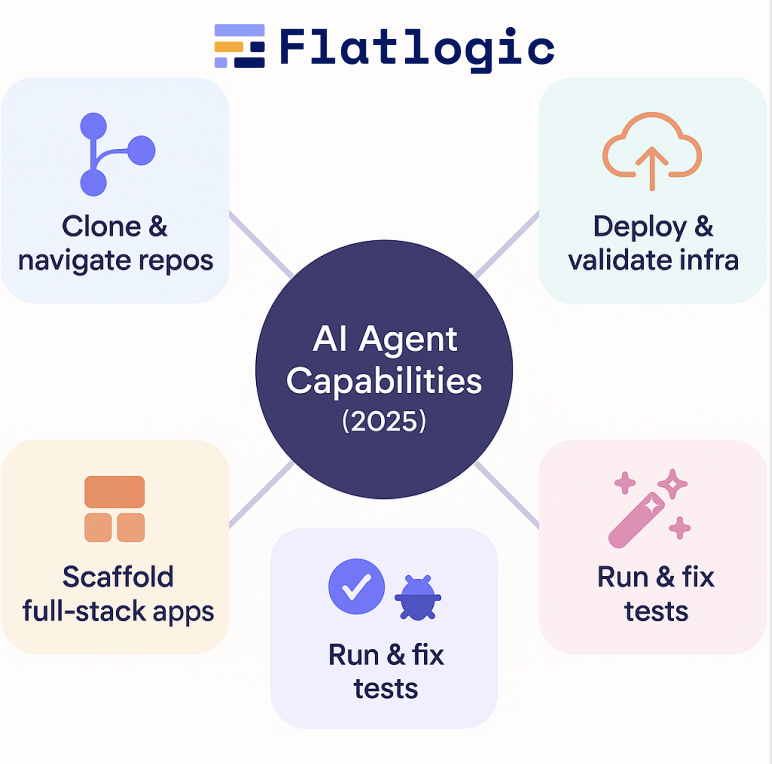
They can clone repos and navigate file structures like a junior dev.
They can scaffold entire full-stack apps from text descriptions.
They can run test suites and fix failures without human intervention.
They can search through thousands of lines of code and apply systematic changes.
They can deploy to cloud environments, generate containers, and validate deployments.
And unlike the ChatGPT era (2023-2024), where developers had to babysit the model line-by-line, 2025 agents can operate in autonomous loops inside controlled sandboxes.
AI Agents vs Traditional Dev Tools Comparison Table
Dimension
Traditional Dev Tools
AI Agents (2025)
Who drives the workflow?
Human developers manually orchestrate every step.
Consistent, deterministic patterns, when paired with generators, enable agents to refactor across repositories.
Speed of initial development
Slow: days/weeks to scaffold full-stack apps.
Fast: minutes/hours to generate a functional base app.
Handling of boilerplate (CRUD, forms, migrations)
Manual, repetitive, error-prone.
Automated: generated from schema + intent extraction.
Code quality consistency
Depends on developer’s skill; style drift happens over time.
Consistent, deterministic patterns when paired with generators; agents refactor across repos.
Cross-file reasoning
Developer must mentally track everything; easy to miss details.
Agents read the entire repo, search relationships, and apply systematic changes.
Refactoring
Tedious, risky on large codebases.
Agents excel at mechanical, wide-scope refactors using type systems & tests.
Debugging
Manual log reading, trial/error, stepping through code.
Autonomous loops: run tests → read errors → attempt fixes.
Traditional development tools give teams full control and predictable, deterministic output, but at the cost of speed, repetitive effort, and high cognitive overhead. AI agents flip this model: they dramatically accelerate scaffolding, CRUD, refactoring, and cross-file changes by orchestrating the same tools that humans traditionally drive. They are not replacements for architecture, domain expertise, or product thinking, but they are powerful accelerators for everything that is structured, mechanical, or repeated. The winning strategy in 2025 isn’t choosing between agents and traditional tools. It’s combining them: humans own the why and what, agents handle the how, and together they deliver software at a velocity that neither could achieve alone.
Best 5+ AI Agents: Where AI Agents and Traditional Dev Actually Work Together
The market is full of “AI app builders” that promise magic and deliver prototypes held together with duct tape. But a small subset of tools actually blend agentic automation with real, maintainable engineering practices, repos, frameworks, CI/CD, databases, Docker, and cloud environments that developers already trust.
This is the category worth paying attention to: tools that don’t try to replace software engineering, but compress the first 50-70% of the development lifecycle, letting developers take over when the work becomes architectural, strategic, or domain-specific. Below is a curated list of platforms that genuinely embody this hybrid model.
A professional AI-driven development platform that gives every user a dedicated real VM with Node/LAMP/Python stacks, Git, Docker, and full Linux environments. Agents operate inside your VM like a junior developer-running commands, editing code, installing packages, generating migrations, debugging, and deploying.
Why it’s unique:
Not a sandbox-real infrastructure with full root-level control
AI agents run actual commands (npm, composer, git, docker, tests, etc.)
Apps run as exportable Git repos using standard frameworks (Next.js, Laravel, Python Flask/FastAPI, etc.)
Built-in deployments, logs, terminals, SSH, and databases
Perfect mix of classical dev workflow + agent automation
Best for: Founders, software teams, and engineers who want production-ready bases + real engineering control, not prototypes.
Lovable
A popular prompt-to-app builder that turns natural language descriptions into full-stack applications. It uses LLM reasoning to infer schema, data models, routes, and UI structure.
Key qualities:
Fastest “idea → working MVP” flow on the market
Intuitive conversational agent for app edits
GitHub export with readable, human-oriented code
Strong focus on frontend polish and usability
Where it excels: Building SaaS prototypes, dashboards, CRUD apps, and web tools in hours-not weeks.
Bolt.new
A high-speed builder for React/Next.js projects with a strong editing agent built into the UI. Bolt is excellent at generating modern, clean component structures.
Key qualities:
Agent rewrites your code incrementally and consistently
Clean React code output using idiomatic patterns
Great for UI-heavy projects, design systems, and landing pages
Fast iteration loops; minimal cognitive load
Best for: Teams building front-end heavy apps, dashboards, or marketing tools.
v0.dev (by Vercel)
An AI-powered UI generator that outputs high-quality React components built on Vercel + shadcn/ui + Tailwind.
Key qualities:
Extremely consistent UI generation
Perfect alignment with modern frontend best practices
Easy export into real Next.js projects
Works well with human-led backend development
Best for: Teams that want AI-generated UI, but manual control over logic, APIs, and architecture.
GitHub Copilot Workspace
A task-planning agent integrated into GitHub: You describe an issue → the agent creates a plan → implements changes → verifies via tests → opens a PR.
Why it matters:
Reads the entire repo
Proposes multi-step plans
Executes changes across modules and folders
Very strong with refactors, bug fixes, and incremental features
Best for: Established teams with mature codebases that want agents to take issues off the backlog.
Replit Agents
Replit’s agent can read your files, make multi-step changes, run the code, and fix errors until the result works.
Key qualities:
Great for small full-stack apps
Super fast iteration
Beginner-friendly but still powerful
Works well for prototypes, internal tools, and solo developers
Best for: Lightweight projects where speed > architecture.
Google Antigravity – Agentic Dev for Cloud Workflows
Google’s agent environment for Workspace and Cloud. Designed for real-world cloud workflows rather than demo theatrics.
Key qualities:
Strong at multi-step planning
Understands cloud resources, configs, and CI/CD pipelines
Good at debugging backend logic and deployments
Designed for large-scale development teams
Best for: Developers working inside the Google ecosystem or teams who need agent-driven cloud automation.
AWS Kiro – Enterprise-Grade Agent Inside the IDE
Amazon’s agentic IDE assistant that executes commands, inspects logs, edits code, and navigates your AWS environment.
Key qualities:
Production-grade safety constraints
Multi-step autonomous debugging
Deep integration with AWS services
Strong for operational and backend-heavy projects
Best for: Enterprise teams that want AI automation without abandoning AWS best practices.
Tool
Type
Agent Capabilities
Code Ownership
Tech Stack
Best For
Key Strength
Main Limitation
AppWizzy
Full agentic builder + real VM dev environment
Runs commands on real VM, edits repos, installs packages, generates migrations, deploys, refactors
Full Git repo ownership
Next.js, Node, Python, LAMP
Production-ready apps, SaaS MVPs, internal tools
Full-stack generation + real infra + developer control
Requires basic engineering literacy (not for total beginners)
Strong safety, reliability, and deep AWS integration
Less beginner-friendly; tied to AWS
How to Choose the Best AI Agent for You
Picking the right AI agent isn’t about hype-it’s about finding the tool that matches your workflow, skill level, and long-term needs. Use these five quick filters:
1. Define Your Goal
Build a full app fast? → Choose a builder (AppWizzy, Lovable).
Modify an existing repo? → Choose a repo-based agent (Copilot Workspace).
Generate UI? → Choose a UI agent (v0.dev, Bolt.new).
2. Decide How Much Control You Need
If you want full Git repo ownership, real frameworks, Docker, and manual editing later, avoid tools that hide code or force proprietary runtimes.
3. Match the Tool to Your Skill Level
Beginner-friendly: Lovable, Replit Agents
Mid-level: Bolt.new, v0.dev
Professional-grade: AppWizzy, AWS Kiro, Google Antigravity
4. Check Stack Compatibility
Choose agents that generate code in stacks you already use (Next.js, Node, LAMP, Python, Laravel, etc.). AI won’t save you from a stack mismatch.
5. Validate Error Handling
Good agents can run commands, tests, logs, and fix their own mistakes. If an agent only generates code once and stops on errors, skip it.
Conclusion
AI agents aren’t replacing developers, they’re reshaping where developers spend their time. Traditional tools still provide the stability, control, and predictability modern engineering relies on, but agents finally remove the repetitive glue work that has slowed teams for decades. The real breakthrough isn’t “AI writes your entire app.” It’s that AI now handles the boring 50-70%, while humans focus on product logic, architecture, and innovation.
If you want to experience the hybrid model in its strongest form, AI agents operating real infrastructure, real repos, real commands, and real stacks, you can try AppWizzy, which combines agentic automation with full developer control and production-ready output.
As we’ve seen throughout this article, the winning strategy in 2025 is not choosing between AI agents and traditional tools, it’s blending them. Teams that adopt this hybrid workflow ship faster, make fewer mistakes, and scale engineering effort far beyond headcount. Agents amplify human capability; they don’t replace it.
The future of software development belongs to teams that know how to use both: developers who understand the “why,” and agents that execute the “how.”
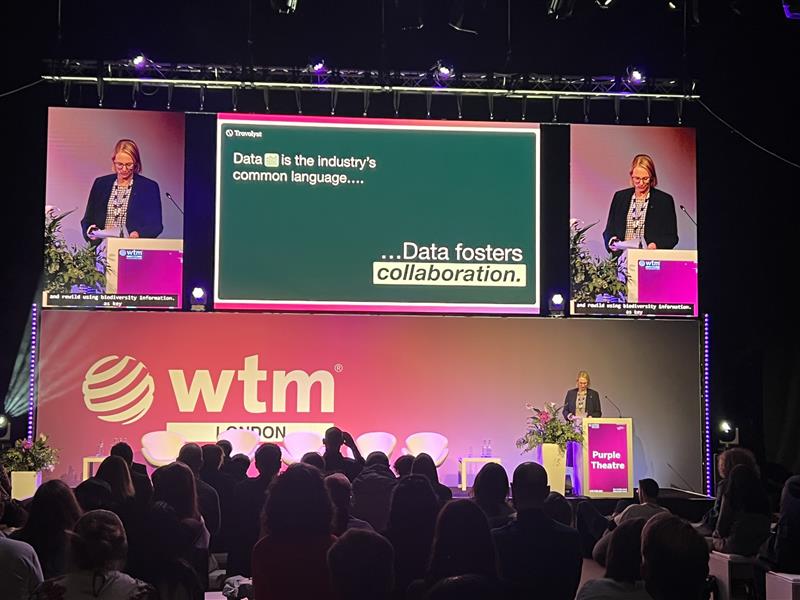
Pune, Inde | [06.11.2025] — EOV (EmbarkingOnVoyage), une société mondiale d’ingénierie de produits et de transformation numérique, a participé à Marché mondial du voyage (WTM) Londres 2025l’un des événements de voyage et de technologie les plus importants et les plus influents au monde.
L’événement a servi de plateforme dynamique pour EOV s’engage avec les leaders mondiaux du voyage, du tourisme et de la technologieéchangez des informations sur l’innovation numérique et explorez de nouvelles opportunités de partenariat dans l’écosystème des technologies du voyage.
Stimuler l’innovation dans la technologie du voyage
La participation d’EOV au WTM Londres renforce son engagement à progresser solutions numériques pour l’industrie mondiale du voyage et de l’hôtellerie. L’entreprise a démontré son expertise dans plates-formes basées sur les données, personnalisation basée sur l’IA, automatisation intelligente et ingénierie de produits moderne— conçu pour aider les entreprises de voyages à réinventer l’expérience client et l’efficacité opérationnelle.
S’exprimant à cette occasion, Abondamment Nag, PDG d’EOVdit: “Le WTM London n’est pas seulement un événement : c’est une plaque tournante de l’innovation mondiale. Être ici nous permet de comprendre l’évolution des attentes des voyageurs et de collaborer avec des entreprises visionnaires qui façonnent l’avenir de la technologie du voyage. Notre objectif est de concevoir des solutions qui rendent les voyages mondiaux plus intelligents, fluides et plus durables. “
Renforcer la présence mondiale
Avec une clientèle croissante à travers le États-Unis, Europe et APACEOV continue d’étendre sa présence dans le domaine des technologies du voyage. La participation de WTM reflète la stratégie d’EOV visant à s’aligner avec des partenaires mondiaux, à co-créer des solutions et à conduire la transformation numérique tout au long de la chaîne de valeur de l’industrie du voyage.
Cette étape ajoute un autre chapitre au parcours d’EOV visant à responsabiliser les entreprises dans divers secteurs, notamment TravelTech, FinTech, HealthTech et cybersécurité-avec sa forte mentalité produit et son excellence en ingénierie.
À propos d’EOV (EmbarkingOnVoyage)
EOV est une société d’ingénierie de produits moderne qui aide les startups, les scale-ups et les entreprises à accélérer l’innovation grâce à une expertise technologique approfondie, une exécution agile et une forte concentration sur l’écosystème Microsoft. Reconnu mondialement, EOV s’associe à des organisations de premier plan pour créer des produits numériques qui créent de l’impact, de l’efficacité et de la croissance.
AppWizzy : 30 % de réduction sur tous les forfaits et crédits IA (20-28 novembre) ; le constructeur agentique full-stack le plus puissant de ce BF.
Lovable et v0 excellent dans l’interface utilisateur/CRUD rapide ; Plasmic exporte du vrai React, mais les backends complexes nécessitent encore du travail.
Bolt.new, Cursor, Replit, Anysphere dirigent les IDE IA ; choisissez les modifications multi-fichiers, les refactorisations et le déploiement/exécution.
Meilleur rapport qualité-prix : remises couvrant les machines virtuelles de calcul, de crédits et de développement, et pas seulement des abonnements moins chers.
Adaptez l’outil aux objectifs : rapidité pour les prototypes ; contrôle full-stack, base de données et agents pour la production.
Boîte d’information
AppWizzy : 30 % de réduction sur tous les abonnements et packs de crédits IA ; codeNOIRFRIDAY30 ; valable du 20 au 28 novembre (23h59 CET).
Lovable : 40 % de réduction annuelle en solo (États-Unis et UE), 25 % de réduction en équipe ; pas de réductions mensuelles.
Bolt.new : 20 % de réduction annuelle sur Bolt Pro ; accès anticipé aux mises à niveau agents : refactors IA, modifications multi-fichiers, mémoire de l’espace de travail.
Replit : 30 % de réduction annuelle sur Hacker, 20 % de réduction sur Teams Pro, plus des crédits de calcul bonus sur les forfaits annuels.
v0 par Vercel : 100 $ de crédit d’utilisation et 15 % de réduction sur Pro ; concentré sur Figma → Génération de code et d’interface utilisateur.
“Si vous souhaitez profiter des meilleures offres du Black Friday sur de véritables outils de création d’applications d’IA et éviter de gaspiller de l’argent pour les mauvais, lisez ceci jusqu’au bout.”
Avant de commencer, vous vous demandez probablement :
Quels créateurs d’applications d’IA sont réellement bons en 2025 ?
Les remises du Black Friday sont-elles vraiment importantes ou s’agit-il simplement d’astuces marketing ?
Quel outil dois-je choisir si je souhaite que mon application fonctionne réellement après la démo ?
Comme l’a dit Steve Jobs, “Les outils ne sont que des outils. C’est ce que vous en faites qui compte.” Et en 2025, les outils d’IA peuvent soit vous aider à construire quelque chose de réel, soit vous faire perdre complètement votre temps.
Le vrai problème est que la plupart des offres en ligne du Black Friday sont destinées aux simples créateurs de sites Web, et non à des outils sérieux capables de créer des applications Web complètes. La recherche montre que la plupart des prototypes générés par l’IA n’avancent jamais parce que les outils qui les sous-tendent ne peuvent pas gérer la logique réelle, les bases de données ou la mise à l’échelle.
En lisant cet article, vous saurez quels créateurs d’applications d’IA sont les meilleurs en ce moment, quelles offres du Black Friday valent réellement la peine d’être achetées, en quoi chaque outil est bon ou mauvais et comment choisir celui qui convient à votre projet. Allons-y.
🔥 L’offre la plus complète parmi les créateurs d’applications « agent ».
Offre du Black Friday 2025 :
30% de réduction tous les abonnements + tous les packs de crédits AI.
Code: VENDREDI NOIR30
Dates : 20 novembre → 28 novembre (23h59 CET)
AppWizzy est le premier outil à promouvoir le modèle de « codage d’ambiance professionnel » : pas seulement des invites brutes, mais des machines virtuelles de développement dédiées, des agents propulsés par Gemini, un accès au terminal, une édition d’arborescence de fichiers, une capture d’écran pour discuter et une conversation vocale. Cette remise s’applique à l’ensemble de la pile, pas seulement aux forfaits les moins chers.
Idéal pour : les fondateurs, les étudiants, les hackathons et les équipes qui souhaitent que « ChatGPT + VSCode + Linux » soient fusionnés en un seul endroit.
Quelle offre est réellement la meilleure ?
La vérité est que la « meilleure » offre du Black Friday dans ce domaine ne concerne pas l’ampleur de la remise. Il s’agit de ce que vous obtenez réellement pour votre argent. Certaines plateformes vous offrent un pourcentage de réduction important, mais uniquement sur le forfait le moins cher. D’autres vous offrent une petite réduction, mais sur des fonctionnalités qui comptent réellement lorsque vous créez de vraies applications.
Si votre objectif est démos rapides ou outils CRUD simplesla meilleure offre est celle qui vous offre la configuration la plus rapide au prix le plus bas, même si la remise elle-même est faible. Ces plateformes sont parfaites pour les prototypes, les projets de classe ou l’apprentissage.
Si tu veux un environnement de développement sérieuxrecherchez des offres qui proposent non seulement des réductions sur les abonnements, mais également calculer, créditer et créer des minutes. Celles-ci sont plus utiles à long terme car elles réduisent directement le coût de création et d’exécution des applications, et pas seulement l’ouverture du tableau de bord.
Si tu tiens à flexibilité et profondeur d’ingénieriela bonne affaire est celle qui débloque un accès complet à l’éditeur, au système de fichiers et aux agents IA capables de fonctionner sur plusieurs fichiers. Même avec une remise moindre, cela vaut bien plus que d’économiser quelques dollars sur un forfait léger.
Et si vous visez travail de productionla meilleure offre est celle qui prend en charge les déploiements réels, les bases de données, le contrôle de version et les modifications complètes. Les capacités approfondies battent toujours les promotions flashy.
Donc en bref :
Pour la vitesse : choisissez l’outil le plus rapide, quel que soit le montant de la remise.
Pour les applications sérieuses : choisissez l’offre qui comprend des crédits de calcul et de construction.
Pour les ingénieurs : choisissez l’environnement qui vous donne le plus de contrôle.
Pour les projets à long terme : choisissez la plate-forme qui évolue avec vous, pas celle avec le pourcentage de réduction le plus élevé.
La meilleure offre est celle qui vous aide à construire, pas seulement celle qui semble la moins chère aujourd’hui.
👉 Vous voulez le deal qui coche toutes ces cases ?
Si vous souhaitez un environnement qui vous offre des crédits de calcul, de véritables machines virtuelles de développement, un contrôle complet et des flux de travail agents, l’offre Black Friday d’AppWizzy est celle qu’il vous faut. 30 % de réduction sur tous les forfaits + tous les crédits, uniquement jusqu’au 28 novembre (23h59 CET).
Le premier webinaire d’AppWizzy a montré la création rapide d’applications via le vibe-coding
400+ inscrits ; ~85 participants réels ont créé une session de type atelier
Chaque application s’exécute sur sa propre VM ; le code est téléchargeable et portable
Construit en direct : tableau Kanban, chat d’enquête sur l’épuisement professionnel et analyses CSV IA
Des applications simples peuvent être expédiées en quelques jours ; les systèmes complexes prennent encore des mois, voire des années
Boîte d’information
Plus de 400 inscriptions ; ~ 85 participants réels après filtrage des robots.
Chaque projet AppWizzy s’exécute sur sa propre VM cloud dédiée.
Modèles disponibles : PHP, Python et Node.js ; plus de piles prévues.
Lors du webinaire, les modèles d’IA pris en charge incluaient Gemini.
Des tableaux de bord simples peuvent être créés en quelques jours ; les systèmes complexes prennent des mois, voire des années.
Nous avons récemment organisé notre premier webinaire AppWizzy, au cours duquel nous avons démontré comment notre plateforme innovante de codage d’ambiance simplifie le développement rapide de logiciels. Cette session intéressante a présenté les fonctionnalités clés d’AppWizzy, offrant un aperçu pratique de la transformation rapide d’idées en applications fonctionnelles. Nous souhaitons remercier chaleureusement tous ceux qui ont participé et vous encourageons à rester à l’écoute des prochains webinaires et des sessions de création d’applications en temps réel plus passionnantes.
Plus de quatre cents inscriptions ont été enregistrées pour l’événement. Après avoir filtré les robots, il restait environ quatre-vingt-cinq participants réels. Beaucoup faisaient déjà partie de notre communauté et apparaissaient régulièrement dans notre Slack, ce qui donnait à la session un sentiment d’atelier plutôt qu’une présentation à sens unique.
Du générateur Flatlogic à AppWizzy
Pendant plusieurs années, le produit principal dans ce domaine était Flatlogic Generator. Au fur et à mesure de l’évolution de la plateforme, elle s’est naturellement divisée en deux directions. Flatlogic s’est concentré sur les services et la fourniture de logiciels personnalisés, tandis qu’AppWizzy est devenu une marque et un produit distincts : un plateforme professionnelle de vibe‑coding.
La philosophie derrière AppWizzy est de conserver la vitesse et l’expérience conversationnelle des outils low‑code tout en évitant leurs limites strictes habituelles. Au lieu de tout placer dans un environnement partagé et opaque, chaque projet d’AppWizzy s’exécute sur son propre environnement. propre machine virtuelle.
Lorsqu’une nouvelle application est créée, une nouvelle VM est provisionnée dans le cloud. Cette VM exécute une véritable pile et peut être traitée comme n’importe quel autre serveur. Pour le moment, la plate-forme est livrée avec des modèles pour PHP, Python et Node.js, et d’autres piles sont prévues. Vous pouvez enregistrer, déboguer, télécharger le code, le déplacer ailleurs et le mettre à l’échelle selon vos besoins. C’est plus proche du « développement logiciel classique » que d’un jouet glisser-déposer, avec simplement un ingénieur en IA assis à côté de vous.
Cet ingénieur IA est alimenté par agents de codage open source et de grands modèles de langage. Nous avions l’habitude d’expérimenter avec notre propre agent interne, mais avons décidé qu’il était beaucoup plus judicieux d’orchestrer les technologies d’IA existantes et éprouvées. Au moment du webinaire, la plate-forme prenait en charge des modèles tels que Gemini et prévoyait également d’ajouter des moteurs de type Code.
Avec ce contexte défini, nous sommes passés à ce que la plupart des gens recherchaient réellement : voir trois applications très différentes prendre vie :
Tâche Kanban/Application CRM : Complet avec authentification et glisser-déposer intuitif.
Chat d’enquête sur l’épuisement professionnel alimenté par l’IA : Doté d’une notation automatique et d’analyses visuelles.
Explorateur de données IA : Téléchargez des fichiers CSV, posez des questions dans un anglais simple et recevez des informations visuelles instantanées.
Ce que ressent réellement la construction avec AppWizzy
Les trois applications ont été créées de la même manière simple. Nous avons choisi un modèle et une pile technologique (dans ce cas, PHP pour les trois), avons donné un nom au projet et décrit ce que nous voulions qu’il fasse. Vous pouvez saisir cette description ou utiliser la voix, ce qui donne l’impression de simplement parler à un coéquipier. À partir de cette description, l’IA a suggéré des rôles de base (comme administrateur ou membre de l’équipe), a demandé si l’application devait être publique ou derrière une connexion, et a rédigé de courtes histoires « en tant qu’utilisateur, je peux… ». Pour le webinaire, nous avons gardé les choses très simples : un rôle et un choix oui/non sur l’authentification.
Ensuite, AppWizzy a créé une nouvelle machine virtuelle et généré la première version de l’application. Dès que la VM était prête, nous avons reçu un lien en direct et l’application fonctionnait déjà : pages ouvertes, formulaires soumis et données enregistrées. Dans l’éditeur, nous pourrions enregistrer des points de contrôle tels que « Basic Kanban v1 » ou « AI Analysis v1 » et revenir en arrière si une modification de l’IA cassait quelque chose. Nous pourrions également prendre une capture d’écran de l’application en direct et l’envoyer à l’IA afin qu’elle puisse « voir » la véritable interface au lieu de deviner. Une fois ce flux en place, nous sommes passés au premier exemple réel.
Démo 1 : Un gestionnaire de tâches de style Kanban sur PHP et MySQL
La première application que nous avons créée était simple et familière : un tableau de tâches qui se situe quelque part entre une liste de tâches et un CRM léger. Nous lui avons donné un nom de style webinaire et, à l’aide de la saisie vocale, avons demandé à AppWizzy un tableau Kanban classique où vous pouvez créer des tâches, les attribuer et les faire glisser entre les colonnes. Nous avons délibérément choisi le modèle PHP, car une grande partie des applications Web réelles fonctionnent encore sur des piles de style PHP et LAMP.
Après avoir traité la description, l’IA a suggéré plusieurs rôles, mais pour que les choses restent rapides, nous n’en avons laissé qu’un : quelqu’un qui peut se connecter, créer, attribuer et déplacer des tâches. Une fois la VM prête, un lien en direct est apparu avec un tableau Kanban fonctionnel soutenu par MySQL. Nous avons créé une tâche de test, actualisé la page et l’avons vue persister, puis enregistré ce premier état sous le nom « Basic Kanban Board v1 » pour avoir un point de restauration sûr.
À partir de là, le public nous a poussé à ajouter le glisser-déposer. L’IA a d’abord rendu les tâches déplaçables, mais l’état n’a pas survécu à une actualisation de la page. Nous avons décrit le problème et envoyé une capture d’écran ; après une autre série de changements, le tableau a finalement mis à jour correctement le statut de la tâche et les cartes sont restées dans leurs nouvelles colonnes. Nous avons ensuite amélioré l’apparence en donnant à chaque colonne sa propre couleur et, comme étape finale, avons ajouté l’enregistrement et la connexion afin que les tâches appartiennent à des comptes spécifiques. Pendant que ces changements plus importants étaient en cours, nous avons montré comment les crédits sont dépensés et remboursés, comment une VM peut être mise en veille pour économiser les coûts d’hébergement et comment le code source PHP complet peut être téléchargé au format ZIP et exécuté n’importe où. À ce stade, la première application était effectivement terminée : un tableau Kanban avec glisser-déposer, couleurs, authentification, tâches par compte et code portable.
Démo 2 : Analyse du burn-out avec chat, enquête et IA
La deuxième application s’est concentrée sur un domaine très différent : le burn-out et l’état émotionnel. Nous avons réutilisé le modèle PHP et n’avons conservé qu’un seul rôle public. L’idée était simple : un assistant de type chat pose une dizaine de questions sur l’énergie, l’humeur et l’attitude au travail ou aux études, puis envoie les réponses à l’IA et renvoie un résumé d’épuisement professionnel avec des graphiques. La première version ne gérait que la conversation ; il vous a remercié et a prétendu « analyser », mais rien n’a été réellement enregistré ou traité.
Ensuite, nous avons demandé à AppWizzy de connecter les réponses à la couche IA intégrée. Chaque modèle possède un dossier AI avec un fichier API local qui appelle des modèles externes (comme OpenAI) à l’aide d’un secret de projet, aucune configuration manuelle n’est donc nécessaire. Après cette étape, un nouveau bouton « Analyser mes résultats » est apparu. En réexécutant l’enquête et en cliquant dessus, vous avez généré une section appropriée « Mon analyse d’épuisement professionnel » avec des scores numériques (par exemple, épuisement et cynisme), un texte expliquant ce qu’ils signifient et des graphiques simples. Sur la base des commentaires, nous avons également déplacé les résultats du chat vers un panneau plus calme, guidé l’IA avec une capture d’écran et ajouté même une option permettant de poser des questions de suivi sur l’analyse. À ce stade, l’application Burnout disposait d’un chat clair pour les questions, d’une vue distincte des résultats, d’une analyse d’IA fonctionnelle et d’un chemin clair pour les extensions futures telles que les rôles d’authentification, d’historique ou de conseiller.
Démo 3 : Analyse CSV et génération de graphiques pilotée par l’IA
La troisième application était la plus complexe : un outil d’analyse CSV alimenté par l’IA avec des graphiques. L’idée était simple sur le papier : téléchargez un fichier CSV, laissez l’IA lire l’en-tête et quelques lignes, obtenez une description en langage simple de l’ensemble de données ainsi que des suggestions de graphiques, puis saisissez le graphique souhaité (par exemple, « diagramme circulaire des répondants par pays ») afin que l’application puisse le générer automatiquement. Nous avons utilisé un véritable ensemble de données d’enquête sur le démarrage d’applications Web, créé une autre application PHP et câblé le téléchargement à la couche IA intégrée. Après cela, le téléchargement du CSV a produit un résumé clair des données et des idées de visualisations utiles. Dans le même temps, nous avons expliqué comment les données sont traitées : chaque application s’exécute sur sa propre VM sécurisée par HTTPS, les fichiers restent sur cette machine et seules les données envoyées pour analyse par l’IA sont transmises au fournisseur d’IA ; pour des configurations plus strictes, le code peut être téléchargé et auto-hébergé.
La partie la plus difficile a été la génération de graphiques en langage naturel. Nous voulions un champ de texte libre, et pas seulement une liste déroulante, afin que quelqu’un puisse décrire à la fois le type et la dimension du graphique en une seule phrase. Les premières tentatives ont échoué : une liste déroulante est apparue à la place, et même lorsque nous avons obtenu le champ de texte, le graphique ne s’est pas rendu correctement. Le backend préparait les bonnes données (noms et décomptes des pays), mais le navigateur affichait du HTML brut au lieu d’une page. Nous avons copié ce HTML dans le chat AI, demandé plus de journalisation et l’avons regardé réparer et casser l’application à plusieurs reprises, y compris quelques erreurs HTTP 500 – de bons rappels qu’il s’agit de vrais bogues de code, pas de problèmes de plate-forme, et que la restauration est toujours une option. Parce que le temps presse, nous sommes passés à une version préparée plus tôt dans la journée, qui fonctionnait déjà dans son intégralité : téléchargez le même fichier CSV d’enquête, laissez l’IA le décrire, tapez « graphique circulaire parmi les éléments suivants qui décrit le mieux votre rôle actuel » et voyez un diagramme circulaire approprié des rôles basé sur environ 120 réponses. Cette démo finale a montré de quoi la fonctionnalité est capable, même si la version en direct n’a pas vraiment atteint la ligne d’arrivée en une heure.
Séance de questions et réponses
Dans quelle mesure cette technologie est-elle utilisée dans la pratique ? Il existe déjà de nombreuses applications créées avec cette plate-forme et les outils associés en production aux États-Unis, en Europe et en Australie. Ceux-ci vont des systèmes CRM et SaaS aux logiciels médicaux et d’assurance, en passant par les outils de prévisions météorologiques et les applications de fitness et de création d’habitudes avec des éléments gamifiés.
Quels sont les délais typiques d’un projet ? Les délais dépendent fortement de la complexité. Un simple tableau de bord ou un petit flux de travail interne peut souvent être créé en quelques jours. Les systèmes plus vastes et profondément intégrés dotés d’une logique métier complexe évoluent naturellement au fil des mois, voire des années. AppWizzy ne supprime pas la complexité en soi, mais il supprime de nombreux passe-partout répétitifs et accélère le travail, permettant aux équipes de construire davantage par elles-mêmes au lieu d’attendre de longs cycles de développement personnalisé.
Utilisez-vous AppWizzy en interne ? Oui. Le système d’inscription pour ce webinaire a été construit avec AppWizzy. En interne, il est utilisé pour la gestion de projet, les outils de comptabilité qui aident à préparer et à transformer des documents, ainsi que pour d’autres petites applications qui nécessiteraient autrement la personnalisation de produits SaaS prêts à l’emploi pour s’adapter aux flux de travail réels. Lorsqu’un processus petit mais important apparaît, il est souvent plus rapide de créer une application ciblée dans AppWizzy que de rechercher et de personnaliser un service externe.
Où peut-on accéder à la plateforme ? À l’heure actuelle, AppWizzy est accessible à la fois via le site AppWizzy et via l’ancien point d’entrée Flatlogic. Les deux se connectent à la même base de données et à la même infrastructure. Au fil du temps, AppWizzy deviendra la principale maison de produits, tandis que Flatlogic se concentrera davantage sur les services, mais pour le moment, l’un ou l’autre point d’entrée fonctionne.
Merci d’avoir rejoint !
Merci d’avoir rejoint notre webinaire et d’en avoir fait un tel succès ! Nous avons été ravis de votre engagement actif ainsi que des questions et idées précieuses que vous avez partagées. Le format interactif a favorisé le travail d’équipe et créé une atmosphère communautaire solidaire. Nous avons partagé des ressources supplémentaires et vous encourageons à rejoindre nos chaînes communautaires pour une assistance, des discussions et des mises à jour continues.
Ce premier webinaire a mis en évidence les atouts d’AppWizzy en matière de simplification et d’accélération du développement d’applications Web. Nous nous engageons à améliorer notre plateforme en fonction de vos commentaires et des tendances émergentes du secteur. Restez à l’écoute des prochains webinaires, au cours desquels nous approfondirons les fonctionnalités avancées, les divers cas d’utilisation et les tendances actuelles en matière de développement de logiciels.
Votre engagement continu et vos commentaires seront déterminants pour nous aider à grandir ensemble !
Vibe-coding builds SaaS pages by describing a mood, not writing code
An 80% landing page was generated in 90 seconds, then refined in 2 hours
Compares top AI tools and offers a goal-based selection framework
Warns about the Franken-Stack trap of stitched-together tools
Flatlogic bridges vibe-coded fronts to full, production apps
Fact Box
A fully designed, responsive landing page was generated in 90 seconds via ChatGPT.
The initial output was roughly 80% complete, needing polish on logo and copy.
Two hours of vibe-coding replaced a six-week spec, design, and dev cycle.
The article maps goals to tools: Framer (aesthetics), Bolt (prototype), Relume (site), Dorik/Unicorn (speed), Unbounce (conversion).
Flatlogic says it can build the full application behind a landing page in minutes.
What if you could build your entire SaaS landing page not by writing code, but by describing a feeling?
If you’re in the SaaS world, you’ve probably asked yourself these questions: “How can I build a landing page that actually feels like my brand?” “Why do all these templates look identical?” Can’t I just tell an AI ‘make it look like Stripe, but friendlier’ and have it work?” And, more recently: “What are these new SaaS vibe coding tools I keep hearing about?“
“Perfection is achieved, not when there is nothing more to add, but when there is nothing left to take away.” – Antoine de Saint-Exupéry
This quote is the very soul of “vibe-coding.” It’s about capturing an essence, not just ticking boxes on a feature list. For years, the process of building a landing page has been a painful, lossy translation. A founder has a ‘vibe’ in their head. They translate that vibe into a weak description for a designer.
The designer translates their visual interpretation into a rigid Figma file. Finally, AI web development companies translate that Figma into code, pixel by pixel. The original “vibe” is long dead. This bottleneck is a real problem. In a world where speed to market is everything, studies from industry giants show that design inconsistency and slow development cycles are a primary reason for product failure.
I’ve been in the software development trenches for over 15 years. I’ve built everything from clunky enterprise dashboards to sleek mobile apps. For most of my career, I was a purist. I believed in the sanctity of the 100-page spec doc. I scoffed at “low-code.” But the recent explosion of generative AI, specifically in the form of AI landing page builders for SaaS, has completely changed my mind. I went from skeptic to evangelist in a single project.
By the end of this article, you will not only understand what ‘vibe-coding’ is but why it’s the single biggest shift for SaaS founders and marketers today. I’ll give you a framework for choosing the right vibe coding tools, a detailed breakdown of the top platforms, and a step-by-step guide to launching a high-converting landing page that finally feels like you.
First, Some Key Definitions
Before we dive into the story, let’s get our terminology straight. This space is new, and the terms are often used interchangeably.
Vibe-Coding: This is a new term, but you’ll see it everywhere soon. It’s the practice of building software (especially front-ends) by describing an aesthetic, a feeling, a user, or a brand’s “vibe” to a generative AI, rather than writing explicit code or using a drag-and-drop editor.
SaaS Vibe Coding Tools: This is the category of platforms that enable vibe-coding. They are the next evolution of no-code. Instead of you dragging a button, you ask the AI to add a button that “feels more urgent” or “looks more minimalist.”
AI Landing Page Builders for SaaS: This is the specific product niche we’re focused on. These are SaaS vibe coding tools designed specifically to create, test, and deploy landing pages for software products.
SaaS Vibe Coders: This is the new role, but it’s not always a person. A “vibe coder” is either the AI itself (the agent doing the work) or the human (a founder, marketer, or designer) who is guiding the AI through natural language prompts.
The Main Event: From Skeptic to Vibe-Coder
Chapter 1: The Tyranny of the Pixel-Perfect Spec
Let me tell you about my old workflow. As a veteran developer, I demanded clarity. A “Project Brief” for a landing page would arrive in my inbox. It was always a disaster.
Marketing would write: “We want a ‘world-class’ and ‘dynamic’ page.”
I would write back: “What does ‘dynamic’ mean? Does it animate? Does it fetch data? Give me the user flow, the acceptance criteria, and the exact hex codes from the brand guide.”
This back-and-forth would take a week. The design process would take two more. The development, another two. By the time we launched, the market had already shifted, or the founder had a new “vibe” they wanted to try. We were slow, we were expensive, and we were always frustrated. Our LA-based software development company was great at building complex apps, but we were a bottleneck for simple landing pages.
This old method fails SaaS precisely because SaaS is about iteration. You need to be able to test a new headline, a new pricing structure, or a completely new value proposition in an afternoon, not in a quarter.
Chapter 2: The “Vibe” Revolution (My ‘Aha!’ Moment)
The project that broke me (and then rebuilt me) was for a startup in Boston, MA. Let’s call them ‘A Random Firm’. They were building a complex B2B data security product.
Their founder was brilliant, but he was the worst kind of client for a spec-driven developer. He kept saying, “It just needs to feel more… ‘inevitable.’ Like a Swiss bank, but for data. Secure, heavy, trustworthy… but also… ‘approachable.’ Make it feel like that.”
I was about to pull my hair out. “What does ‘inevitable’ look like?!”
Out of sheer desperation, I decided to test one of the new AI landing page builders for SaaS that my junior dev had been raving about. I signed up for ChatGPT, cracked my knuckles, and, feeling ridiculous, I typed this prompt:
“Create a landing page for a B2B SaaS company called A Random Firm. The product is a cybersecurity platform. The vibe is secure, professional, and trustworthy, like a Swiss bank, but with a modern, friendly UI. Use a dark blue, white, and emerald green palette. The headline should be ‘Data Security That Feels Inevitable.’ Add a ‘Request Demo’ CTA.”
Ninety seconds later, I had a fully-designed, responsive, and beautiful landing page.
It wasn’t perfect. The logo was a placeholder, and the copy was a bit generic. But it was 80% there. In 90 seconds.
Here’s how it looked!
After that, I spent the next hour “vibe-coding” with the founder.
Founder: “It’s good, but I don’t see a ‘features’ section. Can we make it… more visible?”
Me: (Typing into the artificial intelligence) “Make the features section more visible. Use icons instead of large images and a more subdued font.”
Founder: “Yes! Love that. Now, the CTA. ‘Request Demo’ is boring. Let’s make it ‘Achieve Inevitability.’”
Me: (Editing the text) “Done. What else?”
We did in two hours what would have taken me six weeks. We weren’t developers or clients. We were just SaaS vibe coders, iterating at the speed of thought. This is the power of SaaS vibe coding tools.
Chapter 3: The New Toolbox: A Breakdown of Vibe-Coding Platforms
My experience with the AI vibe coding tool sent me down a rabbit hole. I realized that not all SaaS vibe coding tools are the same. They exist on a spectrum, from pure “vibe” generators to conversion-focused optimizers.
This is a critical space. Even traditional AI web development companies are now integrating these tools to accelerate their prototyping and deployment, turning weeks of work into days. Serving the greater Seattle area, we see startups that simply cannot wait for traditional dev cycles. They need these AI landing page builders for SaaS to survive.
Here is a breakdown of the top players I’ve tested:
Comparison of Leading SaaS Vibe Coding Tools
Platform
Best For (The “Vibe”)
How it Works
Key Feature
AppWizzy
The Builder’s Vibe: “Make it dynamic and app-ready.”
Prompt-to-App-UI. You describe your app idea, and it generates multi-screen flows with interactive elements.
App-centric output. Unlike website-first tools, it specializes in app-like interfaces and feature workflows.
Framer AI
The Designer’s Vibe: “Make it beautiful and award-worthy.”
Prompt-to-Site. You describe your site, and it generates a full, editable, and animated design.
Unmatched aesthetics. It builds with components and animations that feel truly high-end.
Bolt AI
The Pure Vibe: “I have a feeling, make it a product.”
This is the tool that literally calls itself a “vibe coding tool.” You chat with an AI agent to build and iterate.
Conversational build process. It’s less of a tool and more of a “dev partner” that you talk to.
Relume AI
The Strategist’s Vibe: “Make it logical and high-converting.”
Prompt-to-Sitemap. You describe your business, and it generates a complete site map and wireframes.
Structure-first. It’s the only tool that focuses on the strategy of your site before the visuals.
Unbounce
The Marketer’s Vibe: “Make it convert, and prove it.”
AI-powered A/B testing and copy generation. Less “vibe” for initial design, more “vibe” for optimization.
Smart Traffic. It uses AI to automatically send visitors to the landing page variant they’re most likely to convert on.
Dorik AI
The Founder’s Vibe: “Make it now.”
Prompt-to-Site. Extremely fast. You give it a prompt, and a full site is ready in a minute.
Speed and simplicity. It’s the fastest way to get a “good enough” page live to test an idea.
ChatGPT
The All-Rounder’s Vibe:“Give me an idea, a style, or a mood – I’ll build anything around it.”
Prompt-to-Everything.You describe the concept, tone, structure, or desired “vibe,” and it generates copy, UI concepts, code, diagrams, tables, wireframes, and strategy on demand.
True versatility.It’s the only tool that can simultaneously act as: a writer, a designer’s assistant, a strategist, a product thinker, and a coding co-pilot – all while maintaining the exact vibe you describe.
Unicorn Platform
The Indie Hacker’s Vibe: “Make it clean, simple, and functional.”
AI-assisted builder. Great for SaaS, apps, and directories.
Focus on SaaS components like pricing tables, feature grids, and changelogs.
These SaaS vibe coding tools are fundamentally changing the game. The barrier to entry for a “professional” look and feel has evaporated.
Chapter 4: A Framework for Choosing Your Tool
So, which of these SaaS vibe coding tools is right for you? It depends on your primary goal. You are the SaaS vibe coder, and these are your instruments.
Code snippetgraph TD A [Start: What is your main goal?] --> B{I need a beautiful 'brand' page}; B --> C[GPT 5]; A --> D{I have an idea and need to build a functional prototype}; D --> E[Bolt AI]; A --> F{I need a full, logical website, not just one page}; F --> G[Relume AI]; A --> H{I need to test an idea, fast and cheap}; H --> I[Dorik AI or Unicorn Platform]; A --> J{My page is live, but it's not converting}; J --> K[Unbounce];
Here is the decision flow I use when advising clients:
To use this flowchart:
Start at the top.
Identify your primary goal for your SaaS landing page.
Follow the path to the recommended tool.
This framework helps you move from “I need a website” to “I need a specific tool for a specific job.” The era of the one-size-fits-all builder is over. We are now in the era of specialized, “vibe-driven” creation.
Chapter 5: The Dark Side of Vibe-Coding (And the Solution)
As a 15-year developer, I have to be honest. “Vibe-coding” is not a silver bullet. It’s a miracle for the storefront (your landing page), but it’s useless for the factory (your actual application).
This is the critical mistake I see founders making. They get a beautiful landing page from one of these AI landing page builders for SaaS, and then they ask, “Great. Now, how do I make it… you know… work? How do I add user accounts, connect to a database, and run my business logic?”
The answer from these SaaS vibe coding tools is silence. They can’t do it.
A “vibe” can’t design your database schema.
A “vibe” can’t build a complex admin panel for you to manage your users.
A “vibe” can’t write the secure, scalable, and complex backend code that your SaaS is.
This is the great divide. Vibe-coding creates a beautiful, hollow shell. For the shell to become a business, you need a real, functional application.
And this is where the old me and the new me come together. You shouldn’t have to choose between a fast, beautiful front-end and a powerful, custom back-end.
This is precisely the problem we built Flatlogic to solve. After you’ve “vibe-coded” your perfect landing page, you need to deliver on the promise. You need the actual app.
Flatlogic Generator will convert this description into a fully functional business web application.
You don’t just get a landing page; you get the entire application. A vibe-coder can’t build a complex, multi-tenant SaaS. But our platform can. We take your requirements (your “vibe,” if you will, but for logic) and generate the front-end, the back-end, and the database for a complete, production-ready application.
Chapter 6: The “Franken-Stack” Trap: Vibe-Coding’s Hidden Cost
Let me be even more specific, because this is the critical, expensive mistake I see founders make every single day. It’s the hidden dark side of these otherwise brilliant SaaS vibe coding tools. I call it the “Franken-Stack” trap.
It starts innocently enough.
You, now empowered as a “vibe-coder,” create a masterpiece of a landing page using one of the AI landing page builders for SaaS. It’s beautiful, and it costs you almost nothing. You’re a genius.
But then, you need a blog. The builder’s blog function is weak, so you set up a subdomain with a tool like Ghost. Then you need a community, so you link out to a Circle or Discord. You need to capture waitlist signups, so you embed a Tally form, which uses a Zapier integration to (slowly) send data to a Google Sheet, which then zaps new users into a Mailchimp sequence.
Each of these tools is “best-in-class” at its one, specific job. But you haven’t built a product. You’ve built a monster. You’ve created a “Franken-Stack.”
The real-world pain comes the second you get traction. You proudly hire your first “real” developer (someone like me) and say, “We have 10,000 signups! Our vibe-coded page is converting like crazy! Now, let’s just ‘plug in’ the real app and migrate all these users.”
As that developer, my heart sinks. I am now forced to be the bad guy.
I have to tell you the truth: There is no “app” to migrate. There is nothing to “plug in.” You don’t have a user database; you have a Google Sheet. You don’t have a unified authentication system; you have three separate email lists with no secure passwords. The “vibe” you built is a hollow movie set.
To build your actual SaaS application, we have to throw all of it away and start from zero.
I’ve seen this happen to startups from Austin, TX, to our own clients here in Boston, MA. They spend six months iterating on a “vibe” and get thousands of signups, only to realize their “product” is a fragile collection of disconnected services held together with digital duct tape. The technical debt they’ve accrued is so high, they collapse before they’ve even written a single line of real code.
This is the glass ceiling of vibe-coding. AI landing page builders for SaaS are brilliant marketing tools, but they are not application development platforms. They are designed to present a value proposition, not execute it. The moment you need a feature that isn’t in their pre-built library-like a custom user dashboard, a team-based permission system, or a unique, multi-variable pricing calculator-you’ve hit a wall.
This is why the entire conversation must shift. We shouldn’t just be asking, “Which SaaS vibe coding tools are best?” We should be asking, “How do we bridge the gap between our ‘vibe’ and our value?”
This isn’t to scare you away from these tools. I use them! But I use them for what they are: the front door. I just make sure I have a real, scalable house being built behind it at the same time.
Conclusion: Your Vibe is Just the Beginning
The rise of SaaS vibe coding tools is the most exciting thing to happen to software in a decade. It tears down the wall between idea and execution. It empowers founders, marketers, and designers to create at the speed of thought, without being blocked by a developer like me.
Here are the key takeaways from this journey:
Vibe-Coding is Here: Building by describing a feeling or aesthetic is no longer a fantasy. Tools like Framer, Bolt AI, and Relume have made it a reality.
A Tool for Every Vibe: The best AI landing page builders for SaaS are specialized. Choose your tool based on your goal: aesthetics (Framer), logic (Relume), conversion (Unbounce), or speed (Dorik).
The Vibe is Not the App: Your landing page is your promise. Your application is how you keep it. These SaaS vibe coding tools are for the promise, not the product.
Stop and think. Your new, vibe-coded landing page looks amazing. It’s generating sign-ups. Now what? Where are those sign-ups going? Into a real app, or just an email list? Don’t let your “vibe” write a check your business can’t cash. Vibe-coding gets you a beautiful front door. Flatlogic builds the entire functioning house behind it in minutes. Stop stitching 10 different tools together. Visit Flatlogic’s service page and let’s build the full application that your beautiful landing page deserves.
Recommends matching tool to needs: prototype speed vs long-term maintainability, team skills, budget, lock-in risk.
Highlights AppWizzy for investor-ready, code-owned, Dockerized full-stack apps; cautions on prototype-first tools.
Fact Box
38% of respondents use AI-powered app generators as their primary way to build web apps in 2025.
AppWizzy gives full repo ownership plus Docker, CI/CD and self-hosting for LAMP or Node/Next.js stacks.
Lovable targets rapid MVPs, typically using Supabase backend with GitHub export for source control.
v0 by Vercel generates React/Next UI (Tailwind, shadcn) and focuses on frontend; backend must be handled separately.
Pythagora is an open-source backend generator that produces APIs and automated tests from conversational prompts.
When someone Googles “AI web app chat-based builder” today, they’re usually not browsing for fun. They’re staring at a deadline, a budget, or an investor meeting and quietly thinking: “Please let this actually work.”
You might be asking yourself questions like:
Can I really build a usable web app just by talking to an AI?
Will this thing still work once I have hundreds of real users, not just demo traffic?
Do I own the code, or am I locking my business into one vendor forever?
Which AI web app chat-based builder is safe for an investor deck, not just a cool demo?
As Satya Nadella famously put it, “Every company is now a software company.” That line stopped being a prediction years ago. In 2025, it’s closer to a survival rule.
From our own annual Starting Web App in 2025 research, 38% of respondents already use AI-powered app generators (Flatlogic, Bolt, Lovable, and others) as their primary way to build web apps – more than traditional hand-coding or classical low-code. Academic surveys on zero-code LLM platforms show the same trend: conversational, LLM-driven builders are no longer toys; they’re a definable category in software engineering research.
The problem is: speed came first, engineering discipline came later. Many teams discover that the wrong AI web app chat-based builder leaves them with brittle code, painful migrations, or security risks. Tools like Lovable, Bolt.new, Replit, and others are growing explosively in usage and funding, but their capabilities and trade-offs differ a lot.
In this article, I’ll walk you through:
What an AI web app chat-based builder actually is (and is not).
How the landscape looks in 2025 – who’s raising billions, who’s open-source, who’s quietly winning enterprise deals.
A practical comparison of 10+ AI web app chat-based builders.
By reading this article, you’ll know which AI web app chat-based builder belongs in your stack – and which ones you should avoid for serious, long-term products.
Terminology: What I Mean by “AI Web App Chat-Based Builder”
Let’s clear the jargon before we drown in it.
Key Terms (Cheat-Sheet)
Term
What does it mean
AI web app chat-based builder
A platform where you describe a web app in natural language (chat, voice, sometimes screenshots) and the system generates a runnable app or major parts of it.
Chat-to-app
Subset of the above: the builder can take a prompt and go all the way to a hosted or deployable app (not just code snippets).
Vibe-coding
A conversational building style where you iteratively talk to an AI (like a junior dev) and refine the app together, often directly in a browser IDE.
Agentic builder
A builder that doesn’t just generate code, but can plan, modify, test, and deploy with an AI “agent” acting across your project.
Prompt-to-production
The full pipeline from a prompt → schema → code → CI/CD → live app.
In other words: an AI web app chat-based builder is your new “junior engineer” you talk to in Slack… except it’s actually an IDE, a generator, and a deployment system glued together.
How an AI Web App Chat-Based Builder Actually Works
Stripping away the hype, most of these platforms follow a similar internal pipeline.
The difference between tools is not the chat window. It’s:
What schema they infer and how strict it is.
Whether they give you real repos and Docker images or just “magic cloud” hosting.
How safely they handle migrations, tests, CI/CD, and rollbacks.
Whether the AI web app chat-based builder understands production constraints (multi-tenancy, RBAC, compliance) or just UI skeletons.
Keep that model in mind as we go through the top players.
TL;TR: Top AI Web App Chat-Based Builders
Here’s a table view before we deep-dive.
Top AI Web App Chat-Based Builders (2025)
Platform
Best For
Code Ownership / Export
Stack / Output
One-Line Take
AppWizzy (by Flatlogic)
Serious SaaS, CRM, ERP, investor-ready MVPs
Full repo, Docker, self-hosting
Full-stack (LAMP, Next/Node + DB + CI/CD)
Engineer-minded AI web app chat-based builder built for apps that need to live for years.
Lovable
Fast MVPs for non-technical founders
GitHub export; hosted runtime
Full-stack SaaS templates
Incredibly fast for early validation, less obvious story for long-term ops.
Bolt.new
Developers who want full control, in-browser
Full code, open-source core
Full-stack in-browser IDE
Chat-plus-IDE combo; powerful but assumes you’re comfortable as a dev.
Replit (AI Web App Builder)
General apps + learning, with AI help
Projects & repos on Replit
Multi-language cloud IDE + builder
Great “playground → startup” path if you like living inside one environment.
v0 (by Vercel)
Designers/devs obsessed with UI speed
React/Next code export
Text-to-UI → Next.js, Tailwind, shadcn
AI web app chat-based builder that’s almost pure front-end muscle.
Debuild
Indie makers, demo-first projects
React + Node export
Low-code web apps
Early “chat-to-app” experiment; still solid for quick dashboards.
Cursor
Engineers living inside an AI-native editor
Full repo, your infra
Any stack you edit in Cursor
Less “no-code”, more “AI super-IDE” with strong chat-based refactors.
Dust.tt
AI workflows + internal tools
App definitions, agents & flows
Agentic AI apps & dashboards
Think: chat-to-agent workflows rather than typical CRUD.
Pythagora
Backend-heavy teams that love OSS
Open-source backend generator
API-driven backends & tests
Great AI web app chat-based builder for backend scaffolding and automated tests.
Quickbase AI Chat-to-App
Ops teams sitting on spreadsheets
Hosted no-code apps
Internal workflow apps
Chat-to-app, but within a classic enterprise no-code ecosystem.
Google AI Studio, Dyad, BuildAI & others
Mixed cases; mostly experiments or niche
Varies
Varies
Worth watching, but not yet my go-to for production business systems.
If you’ve wondered how chatting with AI can instantly turn your ideas into a robust web application, this guide reveals precisely that. Deep Dive: The Platforms, Through a Practitioner’s Eyes
AppWizzy enables users to effortlessly chat with AI to build full-stack applications with dedicated VMs, supporting frameworks like LAMP or Node/Next.js. It includes critical infrastructure such as databases, domains, CI/CD pipelines, and Docker containers. The system prioritizes long-term sustainability, focusing heavily on maintainability and code quality. Users own their code, avoiding vendor lock-ins, with robust integration of version control via Git and containerized deployments. Its hybrid deterministic and AI-driven approach guarantees predictability in app performance.
Target Audience: Startups, capital-raising founders, enterprise-level businesses, and software agencies.
Pitfalls: Not ideal for rapid throwaway prototypes due to the structured workflow.
Pricing & Complexity: Premium pricing; moderate complexity, ideal for teams or founders with tech knowledge.
Lovable
Lovable streamlines rapid prototyping by allowing users to create SaaS applications through simple AI conversations. The backend is typically powered by Supabase with GitHub integration for source control. Lovable excels at delivering rapid MVPs, primarily aimed at validating concepts quickly. It’s designed predominantly for non-technical founders needing visual, functional results rapidly. However, this speed can sometimes compromise long-term maintainability and code cleanliness.
Target Audience: Solo entrepreneurs, indie hackers, marketing teams.
Key Features: Instant prototypes, AI conversational UI, and user-friendly.
Pitfalls: Potential messy code, security vulnerabilities in rapidly generated apps.
Pricing & Complexity: Affordable; low complexity suitable for beginners.
Bolt.new
Bolt.new provides an integrated browser IDE where developers interact with an AI agent to scaffold, modify, and deploy full-stack applications directly. Ideal for technical users, Bolt emphasizes a seamless developer experience, complete with file management, real-time preview, and direct deployment. Its powerful AI capabilities accelerate typical development workflows substantially. However, non-technical users might find it overwhelming, given its rich, terminal-oriented environment.
Target Audience: Experienced developers, dev teams, hackathons.
Key Features: Full IDE, terminal access, instant deployment.
Pitfalls: Complexity for non-developers, potential for uncontrolled AI token expenses.
Pricing & Complexity: Moderate pricing; high complexity suited for experienced developers.
Replit
Replit’s AI-powered web and chat app builders provide users with a streamlined cloud-based environment to scaffold and refine applications through conversation. Users can seamlessly transition from app idea to deployed projects entirely within Replit’s ecosystem. Its robust community and educational resources make it highly accessible. Nonetheless, reliance on a single environment raises concerns about vendor lock-in and occasional AI-driven operational errors.
Target Audience: Educational institutions, developers, and startup founders.
Key Features: Comprehensive ecosystem, educational resources, built-in IDE, and hosting.
Pitfalls: Occasional severe AI mistakes, ecosystem lock-in risks.
Pricing & Complexity: Competitive; moderate complexity, balanced between beginners and experts.
v0 (by Vercel)
v0 specializes in generating frontend components and UI designs via AI-driven conversational input. Designed explicitly for rapid UI prototyping, it delivers React, Tailwind CSS, and Shadcn UI components optimized for Vercel deployment. Ideal for teams and individuals focused heavily on UI/UX, it offers detailed refinement capabilities. However, the backend component must be managed separately, limiting its scope for full-stack solutions.
Target Audience: Designers, front-end developers, startups focused on UI.
Key Features: High-quality React exports, detailed UI refinement, direct deployment to Vercel.
Pitfalls: Limited backend capabilities, potential codebase complexity with larger apps.
Pricing & Complexity: Moderate pricing; low to medium complexity.
Debuild
Debuild quickly translates plain-English descriptions into functional web apps, mixing visual assembly with conversational prompts. It offers fast iteration with immediate app deployment, making it highly suitable for quick testing and investor demos. Its mixed conversational and visual approach simplifies development but can fall short for enterprise-grade long-term app stability.
Cursor operates as an AI-enhanced coding editor offering code generation, multi-file handling, and deep Git integration via a conversational AI. While not strictly a builder, its capability to quickly scaffold and refine projects makes it highly useful for developers familiar with coding workflows. Its AI acts as an advanced coding assistant rather than a purely conversational tool, making it suitable for professional coders.
Target Audience: Professional developers, software engineering teams.
Key Features: Multi-file understanding, seamless Git integration, and AI-assisted refactoring.
Pricing & Complexity: Moderate pricing; high complexity.
Dust.tt
Dust.tt enables users to build complex AI agent-based workflows and applications without extensive coding skills. It is highly effective for integrating disparate data sources and automating processes using conversational interactions. Ideal for internal tools and dashboards, Dust.tt simplifies workflow creation for non-technical users. It may, however, be too niche for traditional CRUD web app scenarios.
Target Audience: Data teams, internal operations teams.
Key Features: AI workflows, no-code automation blocks, and internal app creation.
Pitfalls: Limited traditional web app capabilities, specific agentic workflow orientation.
Pricing & Complexity: Mid-tier pricing; low to medium complexity.
Pythagora
Pythagora focuses heavily on generating backend applications and automated test cases directly from conversational prompts and API data. Designed with engineers in mind, its open-source transparency ensures maximum developer control and adaptability. It excels in API-driven backend scaffolding and rigorous automated testing scenarios.
Target Audience: Backend-focused dev teams, API developers, open-source enthusiasts.
Pitfalls: Primarily backend-oriented, requires development expertise.
Pricing & Complexity: Open-source/free; moderate to high complexity.
Quickbase AI Chat-to-App
Quickbase integrates conversational AI capabilities into its established no-code enterprise platform, enabling rapid generation of internal business applications. Its primary strength is workflow automation based on existing data structures, such as spreadsheets. It is ideal for operations and IT departments seeking quick and governance-compliant application development.
Target Audience: Enterprise ops managers, IT teams, business analysts.
Key Features: Instant app generation from spreadsheets, built-in compliance and governance.
Pitfalls: Limited external use cases, heavy reliance on the Quickbase ecosystem.
Google AI Studio, Dyad, BuildAI & Emerging Players
Emerging platforms such as Google AI Studio, Dyad, and BuildAI offer various capabilities ranging from LLM-driven prototypes to locally friendly and privacy-focused solutions. While promising, these platforms currently serve specialized or experimental niches rather than comprehensive production use cases.
Pitfalls: Limited maturity for enterprise use, rapidly changing ecosystems.
Pricing & Complexity: Generally affordable or experimental; complexity varies.
How to Choose the Right AI Web App Chat-Based Builder
Choosing the right AI web app chat-based builder requires understanding your specific project needs, team composition, and long-term objectives. Consider the following factors:
Identify Your Project Requirements
Determine whether you need quick prototypes or comprehensive enterprise-level applications.
Evaluate if your project requires specific integrations, backend services, or complex frontend designs.
Assess Your Team’s Expertise
Clearly define your team’s technical capabilities and familiarity with development processes.
Choose tools aligned with your team’s existing skillset to maximize productivity.
Evaluate Long-Term Viability
Consider the importance of code ownership and flexibility for future development and maintenance.
Understand potential vendor lock-in risks associated with proprietary platforms.
Budget and Complexity
Analyze your available budget against the complexity and feature set of potential builders.
Factor in scalability and future growth when considering pricing structures.
Conclusion: The 80/20 of AI Web App Chat-Based Builders
Choosing the optimal AI web app chat-based builder significantly impacts the efficiency and quality of your application development. A thoughtful selection tailored to your specific requirements, expertise, and long-term strategic objectives ensures not only immediate project success but sustained growth and adaptability. As the technology landscape evolves rapidly, it is critical to invest in tools that provide flexibility, scalability, and ease of integration with emerging technologies.
Leveraging AI chat-based builders effectively allows teams to accelerate development cycles, reduce operational overhead, and deliver more refined products to market faster. Staying agile and adaptable with AI tools ensures businesses can respond swiftly to market changes, maintain a competitive edge, and continuously innovate.
To effectively streamline your web app development process and maintain full control over your project’s future, explore AppWizzy today and see firsthand how intuitive AI-driven development can transform your ideas into fully functional, scalable applications. Embrace the potential of conversational AI and position your projects for ongoing success in an increasingly digital-first world.
30% de réduction sur tous les abonnements et crédits Flatlogic
Utilisez le code BLACKFRIDAY30 lors du paiement
Valable du 20 au 28 novembre 2025 jusqu’à 23h59 CET
Remise instantanée, sans aucune condition
Commencez sur flatlogic.com
Boîte d’information
Flatlogic offre 30 % de réduction sur tous les plans d’abonnement et crédits pour le Black Friday 2025. Source
Utilisez le code promotionnel BLACKFRIDAY30 à la caisse pour appliquer la réduction de 30 %. Source
L’offre est valable du 20 au 28 novembre 2025 ; la date limite finale est le 28 novembre 2025 à 23h59 CET. Source
La réduction s’applique instantanément à la caisse ; sans attaches. Source
Pour échanger : visitez flatlogic.com, choisissez un forfait ou des crédits, entrez BLACKFRIDAY30. Source
C’est à nouveau cette période de l’année : le Black Friday est là ! Et cette fois, nous rendons à notre communauté de constructeurs, de fondateurs et de développeurs une offre spéciale pour vous aider à construire plus rapidement, plus intelligemment et à moindre coût.
Depuis 20 novembre au 28 novembrevous pouvez obtenir 30% de réduction:
Utiliser le code promo VENDREDI NOIR30 à la caisse et regardez votre baisse totale instantanément. C’est votre chance de économiser gros tout en accélérant votre travail avec nos plateformes basées sur l’IA.
💡 Comment ça marche
Allez sur flatlogic.com.
Choisissez votre forfait ou vos crédits.
Entrez le code promotionnel VENDREDI NOIR30 à la caisse.
Profitez de 30 % de réduction instantanément – sans aucune condition.
🕒 Offre valable jusqu’au 28 novembre 2025 (23h59 CET). Après cela, l’accord disparaît jusqu’à l’année prochaine.
Ne manquez pas votre chance d’améliorer votre flux de travail et de donner vie à vos idées : ce Black Friday, votre prochain grand projet vient de se rapprocher de 30 %. 👉 Commencez à construire maintenant
Les applications se mettent automatiquement en veille 1 jour après la dernière utilisation du crédit, sauf si Always_on est défini.
Les applications en pause arrêtent les frais d’hébergement ; Always_on maintient les applications actives et facturées
Suppression automatique des machines virtuelles suspendues après deux semaines ; votre code GitHub reste intact
Reprenez et activez Always_on dans Paramètres ; pause/reprise manuelle disponible dans l’éditeur
Boîte d’information
Les applications se mettent automatiquement en veille 1 jour après la dernière utilisation du crédit, sauf si Always_on est activé.
Si Always_on est activé, votre application reste active et continue d’être facturée
Si Always_on est désactivé, votre application est automatiquement mise en pause et ne génère aucun frais d’hébergement.
Les machines virtuelles qui restent en pause sont automatiquement supprimées après deux semaines
Les applications existantes répondant aux critères ont été suspendues
Nous introduisons un nouveau système pour aider à optimiser les ressources d’hébergement et la facturation. À partir de maintenant, toutes les applications passeront automatiquement en mode veille un jour après leur dernière utilisation de crédit, sauf si l’indicateur Always_on est activé.
Voici ce que cela signifie :
🔹 Si toujours_on est activé : votre application reste active et continue d’être facturée comme d’habitude.
🔹 Si toujours_on est désactivé : votre application sera automatiquement suspendue et n’entraînera aucun frais d’hébergement.
Dans le cadre de ce changement, vos applications existantes qui correspondaient aux critères ont été suspendues.
Important: Après deux semaines, les machines virtuelles qui restent en pause seront automatiquement supprimées. Votre code stocké dans GitHub restera inchangé et sécurisé.
Comment ça marche
Si vous souhaitez que votre application reste active en permanence, veuillez suivre ces étapes :
Connectez-vous à votre compte et choisissez votre projet.
Accédez à votre projet Paramètres languette.
Cliquez CV sur les applications en pause.
Activer le toujours_on drapeau pour les faire fonctionner et les facturer à l’avenir.
De plus, sous l’onglet Éditeur, nous avons introduit une fonctionnalité pratique vous permettant de suspendre et de réactiver manuellement votre VM directement. Cela offre un contrôle plus granulaire et immédiat sur vos ressources d’hébergement, vous permettant de répondre rapidement aux différentes demandes de charge de travail ou aux besoins de maintenance sans affecter négativement votre facturation.
Merci de votre compréhension et de faire partie de notre communauté de développeurs.